
Founder & CEO, Devot AI
A multi-domain Data Scientist and Software Engineer specializing in NLP, Large Language Models, and scalable AI systems. Aviral leads Devot AI with a focus on building production-ready solutions that solve complex business challenges.
When you pick storage in AWS, you are choosing how your system breathes. Not just where bytes live.
This piece walks through AWS S3 vs EBS vs EFS with an operator’s lens. What fails, what scales, and what compromises you’ll live with.
Executive Summary
Storage choices shape latency, blast radius, and how teams collaborate. The wrong fit forces fixes in code, pipelines, and incident playbooks.
This guide treats AWS S3 vs EBS vs EFS as living parts of systems under load, not as product blurbs.
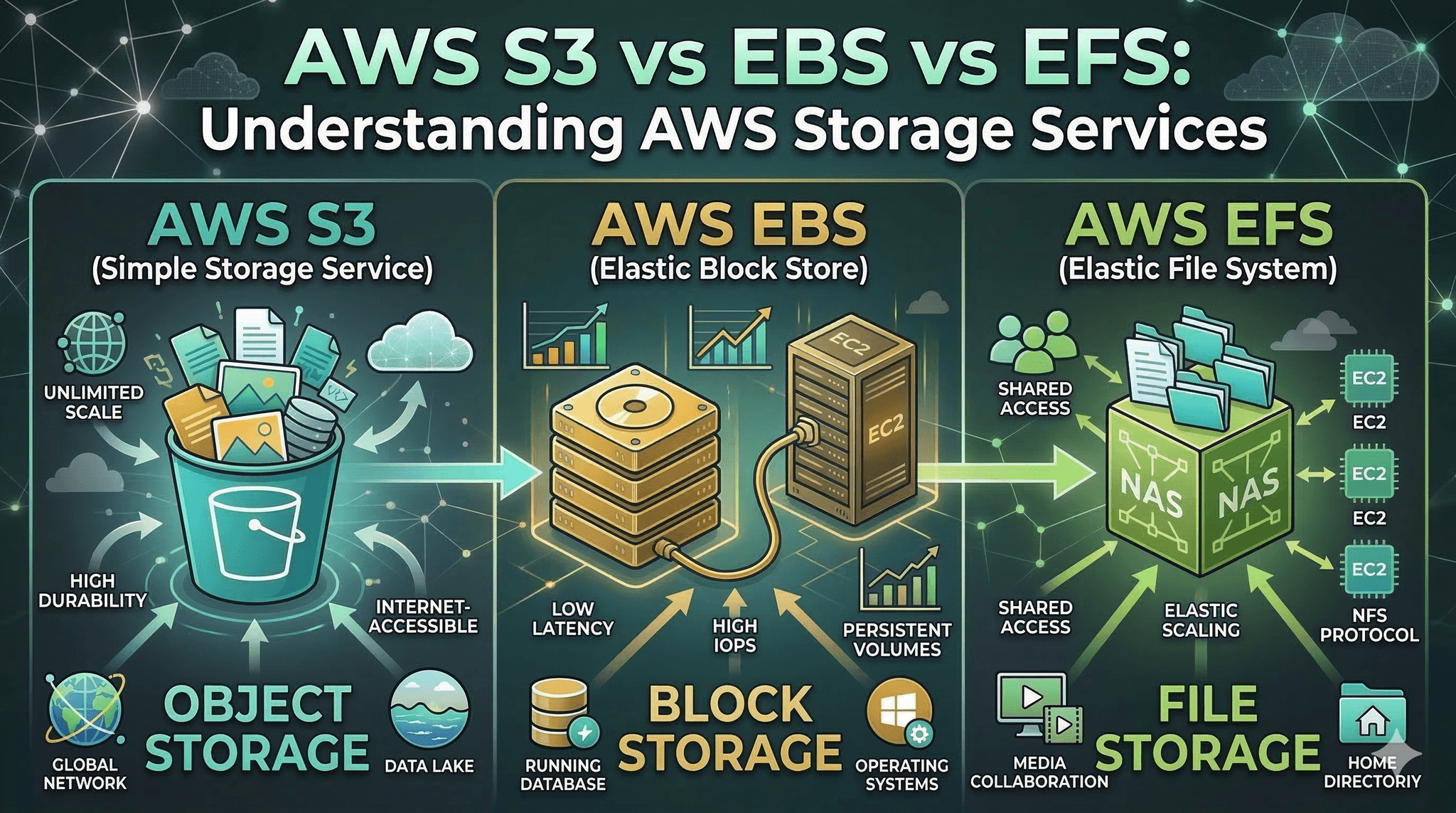
S3: object storage for durability and parallelism, slower per-request feel, great for artifacts and large immutable data.
EBS: block storage for per-instance low-latency IO, ideal for boot volumes and databases, limited sharing.
EFS: shared POSIX file system, simpler multi-host coordination, network-bound latency and throughput ceilings.
You’ll see how each behaves, where friction shows up, and a practical path from prototype to scale.
Introduction
A familiar scene: a new workload ships fast on a single instance. Traffic rises. One day, deploys slow down, batch jobs collide, and cache warm-ups take forever. Storage, once an afterthought, becomes the constraint.
AWS S3 vs EBS vs EFS: Understanding AWS Storage Services is trending because teams are hitting limits earlier. Modern stacks mix streaming, analytics, and CI-heavy workflows. Storage misalignment surfaces as latency spikes, contention, and cost surprises.
Making sense of AWS S3 vs EBS vs EFS is now a necessity. It decides boot times, recovery windows, and whether your app shares state safely.
When storage choices bite: what breaks first
Real environments expose the trade-offs fast. S3 favors width and durability over single-request speed. EBS delivers tight latency but keeps scope local. EFS simplifies shared access but adds network tax.
Storage decision map across object, block, and shared file
Boundaries appear where access patterns and guarantees mismatch. Small, chatty writes to S3 feel slow and amplify retries. A hot path on a modest EBS volume hits throughput ceilings under bursty load. Shared builds hammer EFS metadata and stall directory listings.
Latency and access patterns
EBS feels like a local disk. It shines when your code expects fast, small, frequent reads and writes. Logs, temp files, transactional stores. It falters when you need multiple writers without strict coordination.
S3 loves parallel bulk. Upload large objects, read by key, batch your operations. It punishes per-request chattiness. Treating S3 like a filesystem leads to frustration.
EFS is a middle path for shared POSIX semantics. Teams plug multiple instances into one directory tree. Easy collaboration, but every path lookup pays a network round trip. Under heavy metadata churn, latency climbs.
Consistency and sharing
S3 offers strong read-after-write for new objects and global durability ideals, but it is not a mountable filesystem. Listing and rename semantics don’t behave like local disk. Code expecting atomic directory operations will break.
EBS is scoped to an instance and Zone. Attaching a single volume to many writers is not your default path and demands careful coordination in niche cases. Failovers must plan for attachment and warmup.
EFS supports many clients with POSIX semantics. That unlocks shared caches and build trees, yet also invites footguns: cross-instance lock contention and serialized metadata hotspots.
Blast radius and recovery
EBS localizes damage and performance. A noisy neighbor on the same instance hurts you; others don’t. Snapshots help recovery, but you plan volume sizing and reset workflows.
S3 isolates failure differently. Objects outlive instances. If a single compute node dies, artifacts remain intact. But recovery depends on re-downloading or reconstructing indexes, which takes time.
EFS sits between. A shared path can centralize state. Good for coordination, bad when one slow client backs up others by locking common paths.
An implementation path that survives growth
From first deploy to sustained scale: how storage roles evolve
Most teams start simple. Then they fight fires. The smoother path is to match storage to the stress that is coming, not just the stress you have today.
Start with the loop you control
Prototype on block storage close to compute. Keep the feedback loop tight. Local database, temp directories, logs. Fast iteration beats early complexity.
Even here, draw a line: data that must outlive instances should not stay only on block. Plan a periodic push to object storage for backups or artifacts.
Pilot the shared bits carefully
As more machines join, you will want shared state. Builds, models, shared media. Mount a shared file system for collaboration, but keep hot transactional pieces on block. Watch directory counts, lock usage, and metadata latency.
If jobs compete over the same path, restructure to separate lanes. Avoid a single shared directory as the queue for everything.
Push cold and large to objects early
Once artifacts are stable, move them to S3. Download-to-use or stream as needed. Stop treating the shared file system as an archive. The object store reduces coupling and shrinks blast radius.
At scale, batch operations, pre-signed access, and lifecycle policies turn into leverage. The payoff is fewer bottlenecks and simpler failure recovery.
Examples and applications that don’t read like a brochure
Build pipelines under pressure
Early: builds write everything to a shared mount. Fast at first, then metadata thrash slows directory listings. Agents wait on each other.
Healthier: write temp outputs to block, publish final artifacts to S3, keep only coordination files on shared. Build times stabilize. Less cross-talk.
Data processing with bursty windows
Early: workers pull input from a shared mount and write checkpoints there. Under surge, shared IO stalls and retries multiply.
Healthier: stage input in S3 with partitioned prefixes, stream chunks down to block for processing, push results back to S3. Shared file system stays for small coordination only.
Stateful services that need fast commits
Early: store transactional state on a shared file system to support failover. Latency jitter shows up at peak.
Healthier: keep the write path on block attached to the active node, replicate snapshots or logs to S3, and use shared mounts for non-critical collaboration.
Tables and comparisons to cut through ambiguity
AspectS3EBSEFSAccess modelObject by keyBlock deviceShared POSIX fileLatency feelHigher per requestLow, predictableNetwork-boundSharingGlobal via APIPer-instance scopeMulti-client mountBest atArtifacts, large dataBoot, databases, tempTeam directories, shared buildsWeak atChatty small opsMany writersHot metadata churnFailure patternSlow listings, retry stormsThroughput caps, attach delaysLock contention, jitter
How choices differ by experience
ScenarioBeginner tendencyExperienced adjustmentShared buildsPut everything on shared mountTemp on block, artifacts on S3, minimal sharedTransactional storeUse shared file for simplicityKeep hot path on block, replicate to objectsLarge datasetsCopy to block for all jobsPartition in objects, stream chunks to blockBackupRely on snapshots onlyMix snapshots with object copies
FAQ
Can I use only one of S3, EBS, or EFS?
You can, but mixed use reduces risk. Block for hot paths, objects for durability, shared for collaboration.
Is EFS always slower than EBS?
EFS adds network latency and metadata overhead. For many small ops, EBS feels faster. For shared reads, EFS is simpler.
When does S3 hurt performance most?
When code makes many tiny, sequential calls. Batch, bundle, and parallelize to fit the object model.
Can I attach one EBS volume to many instances?
Not as a simple default. Coordinated multi-writer setups exist but come with constraints.
What if I need fast startup and shared state?
Keep the boot and hot cache on block. Load shared assets from EFS or S3 at init, then operate locally.
Accountability is shifting from storage teams to application code
Storage no longer hides behind tickets. The fastest fixes happen in code paths and data layouts. Teams that encode storage intent into their workflows avoid firefights later.
Decisions around AWS S3 vs EBS vs EFS show up in latency graphs and deploy speed. Make the trade-offs explicit, then let the system prove them in production.